Seva Sindhu Portal Karnataka – Login, Registration, Apply for Services & Track Status (2026)
Seva Sindhu is Karnataka Government’s official integrated service delivery platform. Launched in 2017 under the Digital Karnataka initiative, it brings more than 880 government services under a single digital window — removing the need to visit different government offices for each requirement.
From applying for a caste certificate to checking Gruhalakshmi status, from submitting a BMTC bus pass application to tracking MPTAAS scholarship status — the Seva Sindhu portal handles everything in one place. It operates under the Service Plus framework developed by the National Informatics Centre (NIC), which powers similar e-governance portals across India.
This guide covers everything a Karnataka resident needs to know about Seva Sindhu in 2026 — registration, login, service application, status tracking, scheme-specific processes, troubleshooting, and more.
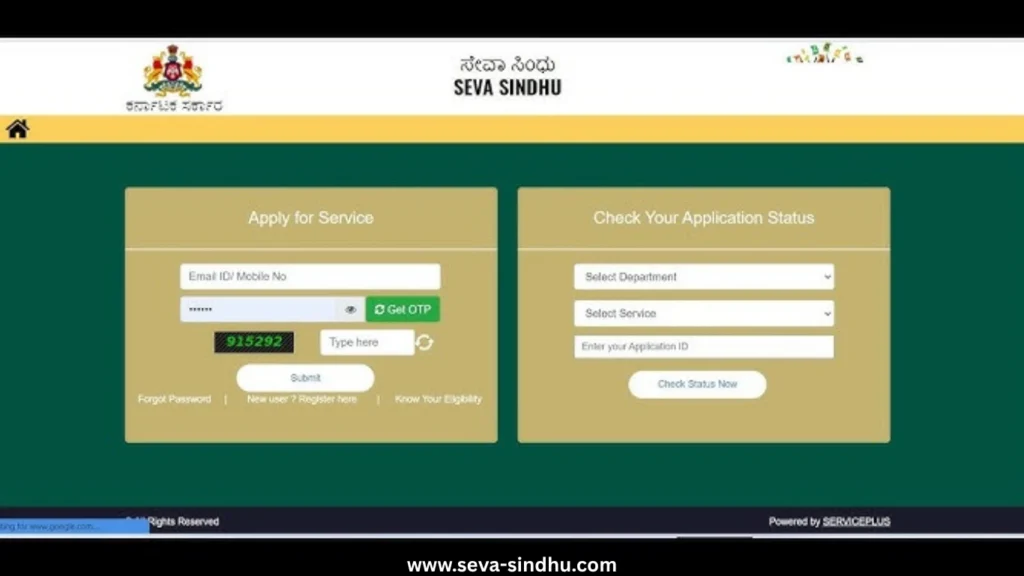
What is Seva Sindhu Portal?
Seva Sindhu (also spelled Seva Sindu) is a Government of Karnataka initiative that functions as a centralized digital platform connecting citizens directly with various government departments. Before this portal existed, a person needing an income certificate, a welfare scheme benefit, and a driving license had to visit three separate offices — sometimes in different cities — with no clear timeline for resolution.
The portal changed that entirely.
Built on the Service Plus architecture, Seva Sindhu integrates data across departments, standardizes the application process, and creates an auditable, transparent workflow. Every application is assigned a unique ID that citizens can use to track real-time progress.
The official portal is accessible at sevasindhu.karnataka.gov.in.
Portal Overview
| Feature | Details |
|---|---|
| Portal Name | Seva Sindhu Portal Karnataka |
| Also Known As | Seva Sindu, Seva Sindhu Service Plus, Seva Sindhu 1 |
| Launched By | Government of Karnataka |
| Launch Year | 2017 |
| Technical Framework | Service Plus (NIC) |
| Total Services Available | 880+ |
| Languages Supported | Kannada, English |
| Mode of Access | Online (24/7) + Physical Service Centers |
| Primary User Base | Karnataka Residents |
| Official Portal | sevasindhu.karnataka.gov.in |
| Dashboard/Status Check | Seva Sindhu Application Status Portal |
| Helpline | 080-22279954 |
Why Seva Sindhu Matters – The Problem It Solves
Understanding why Seva Sindhu was created gives context to how it should be used.
Before 2017, Karnataka residents faced a fragmented government services ecosystem. Each department — Revenue, Transport, Labour, Women and Child Development — had its own procedures, timelines, office locations, and documentation standards. Citizens with limited literacy, no access to transport, or irregular work schedules found it genuinely difficult to access services they were entitled to.
The consequences were practical and significant: welfare scheme benefits were delayed, certificates took weeks, and the absence of tracking mechanisms made corruption easier and accountability harder.
Seva Sindhu addressed this by:
- Creating a single login for access to all department services
- Standardizing document upload and verification procedures
- Establishing mandatory processing timelines for each service type
- Enabling Direct Benefit Transfer (DBT) for financial schemes
- Publishing application status in real time
The portal is not merely a digital convenience — it is a structural reform in how the state government delivers public services.
Seva Sindhu Portal Registration – Step-by-Step Guide (2026)
Before using any service on the Seva Sindhu portal, new users must complete a one-time registration. The process is Aadhaar-based, which ensures identity verification and prevents duplicate registrations.
Documents Needed for Registration
- Aadhaar Card (mandatory)
- Mobile number linked to Aadhaar
- Valid email ID
- Basic personal details (name, address, district, PIN code)
Step-by-Step Registration Process
Step 1 – Visit the Official Portal
Go to sevasindhu.karnataka.gov.in. The homepage displays scheme updates, service categories, and login options.
Step 2 – Click “New User Registration”
Located prominently on the homepage. This initiates the Seva Sindhu registration process.
Step 3 – Enter Aadhaar-Linked Mobile Number
The system will send a One-Time Password (OTP) to the registered mobile number. If your mobile is not linked to Aadhaar, registration cannot proceed online — visit a Common Service Centre (CSC) or Seva Sindhu Service Center for assisted registration.
Step 4 – OTP Verification
Enter the OTP within the time window (typically 10 minutes). If the OTP pop-up does not appear, try refreshing the page or using a different browser. Early morning access (before 9 AM) generally results in fewer server-side delays.
Step 5 – Fill Personal Details
Provide full name as it appears on Aadhaar, address, email ID, district, and PIN code. These details form the base of your citizen profile.
Step 6 – Create Login Credentials
Set a strong password. Avoid using personal identifiers like birthdate or mobile number as passwords.
Step 7 – Submit and Verify
Upon successful submission, a registration confirmation is sent to the provided email ID. The account is immediately active for service applications.
Seva Sindhu Login – How to Access Your Dashboard
Once registered, Seva Sindhu login is straightforward.
Login Steps:
- Visit sevasindhu.karnataka.gov.in
- Click the “Login” button on the homepage
- Enter registered email ID or mobile number
- Enter password
- Complete CAPTCHA verification
- Click “Submit”
After login, the dashboard displays available services, ongoing applications, and scheme-related notifications.
Note: If you forget your password, use the “Forgot Password” option on the login page, which sends a reset link to your registered email ID.
Services Available on Seva Sindhu Portal
The 880+ services on Seva Sindhu are organized by department. Below is a structured overview of the most accessed services.
Revenue Department
- Caste Certificate
- Income Certificate
- Residential (Domicile) Certificate
- Land Records (RTC / Pahani)
- Family Tree Certificate
- OBC Certificate
These certificates are among the highest-volume services on the portal, required for school admissions, scholarship applications, government job applications, and scheme enrollment.
Transport Department
- Driving License Application
- Learner’s License
- Vehicle Registration
- Road Tax Payment
- Permit Renewal
- Transfer of Ownership
Citizens can apply for transport services without visiting the Regional Transport Office (RTO) for most transactions. Document verification is handled through the uploaded scans.
Women and Child Development Department
- Gruhalakshmi Yojana Application
- Anganwadi-Related Services
- Nutrition Scheme Enrollment
- POSHAN Tracker Integration
The Gruhalakshmi scheme — which provides monthly financial assistance to women heads of households — is one of the most accessed welfare services on the portal.
Energy Department
- Gruha Jyothi Scheme Application
- Electricity Bill Linkage and De-linkage
- Consumer ID Verification
The Gruha Jyothi scheme, which provides free electricity up to a specified unit limit for domestic consumers, is processed through the portal with linkage to electricity consumer IDs.
Education and Technical Education Department (DTE)
- Scholarship Applications (Pre-Matric and Post-Matric)
- MPTAAS Scholarship Status Check
- Original Diploma Request
- Diploma Certificate Verification
- BMTC Bus Pass Application for Students
- KSRTC Student Pass Application
MPTAAS (Minority Pre and Post Matric Scholarship) status checks are frequently searched through the portal. Students can monitor their application progress after submission.
Labour Department
- Labour Card Registration
- Construction Worker Welfare Scheme
- Labour Welfare Fund Benefits
Employment Department
- Yuva Nidhi Scheme Application
- Yuva Nidhi Application Status
- Employment Exchange Registration
Health Department
- Birth Certificate
- Death Certificate
- Registration Under Health Schemes
- Arogyasri and Other Medical Support Programs
Social Welfare / Backward Classes Welfare Department (BCWD)
- SC/ST Welfare Schemes
- Financial Assistance Applications
- Hostel Admission for Government Welfare Hostels
Police Department
- Police Verification Certificate (for employment)
- Character Certificate
Most Accessed Schemes on Seva Sindhu – Detailed Overview
Gruha Jyothi Scheme
Gruha Jyothi is a flagship welfare scheme providing free electricity up to 200 units per month for eligible domestic consumers in Karnataka. The scheme is administered through the Energy Department and requires linkage between the beneficiary’s Aadhaar, bank account, and electricity consumer ID.
Application Process on Seva Sindhu:
- Login to the portal
- Navigate to Energy Department services
- Select Gruha Jyothi
- Enter consumer ID and Aadhaar details
- Verify through OTP
- Submit application
Common Issue: Several fields in the Gruha Jyothi application form are auto-populated from government databases and cannot be manually edited. If the pre-filled data is incorrect — particularly the consumer name or connection type — the applicant needs to contact BESCOM/MESCOM directly to update records before reapplying.
BENEFICIARY_ALREADY_MAPPED Error: This error appears when an Aadhaar number or consumer ID is already linked to a beneficiary entry in the system. It can occur due to duplicate registrations or previous applications. Resolution requires contacting the helpline with the consumer ID and Aadhaar number for manual verification.
Gruhalakshmi Scheme
Gruhalakshmi provides monthly direct benefit transfer to eligible women who are the head of their household. The scheme targets economically vulnerable families and is one of the higher-volume schemes on the Seva Sindhu portal.
Eligibility Criteria:
- Woman must be the primary head of household
- Karnataka resident
- Must not already be receiving similar state government benefits
- Aadhaar-linked bank account required for DBT
Checking Gruhalakshmi Status on Seva Sindhu:
- Visit the portal
- Navigate to application status section
- Select Women and Child Development Department
- Enter application ID or registered mobile number
- View current status
Mahiti Kanaja Gruhalakshmi status can also be checked through the Mahiti Kanaja dashboard, which aggregates welfare scheme data for registered beneficiaries.
Common Issue – Link Redirect Loop: Some users report that clicking the Gruhalakshmi application link reloads the same page. This is typically a browser-side caching issue. Solutions: clear browser cache and cookies, use an updated version of Chrome or Firefox, or attempt access during off-peak hours (early morning is recommended).
Yuva Nidhi Scheme
Yuva Nidhi provides financial assistance to unemployed graduates and diploma holders in Karnataka. It is available for a defined period after degree completion.
Eligibility:
- Karnataka resident
- Completed graduation (ITI, diploma, or degree)
- Currently unemployed
- Registered on the employment exchange
Application on Seva Sindhu: Applications are submitted through the Employment Department section. Supporting documents include degree certificates, bank account details (Aadhaar-linked), and residency proof.
MPTAAS Scholarship
The Minority Pre and Post Matric Scholarship (MPTAAS) is for students from minority communities in Karnataka. Applications and status tracking are available through the Seva Sindhu portal.
MPTAAS Scholarship Status Check: Log in, navigate to Education/Social Welfare Department services, enter the application reference number. Status updates reflect verification stages from institution level to department level to disbursement.
BMTC Bus Pass Application
BMTC (Bruhat Bengaluru Mahanagara Palike Transport Corporation) student bus passes can be applied for through the Seva Sindhu portal. The process requires:
- Student’s institutional identity proof
- Residential address proof
- Photograph
- Route details
After submission, the pass is issued through the BMTC system and can be collected from designated counters or delivered based on the option selected.
How to Check Seva Sindhu Application Status
Application status tracking is one of the most used features of the portal. Citizens do not need to call any office or visit in person — the status is updated at each stage of processing.
Steps to Track Application Status:
- Visit sevasindhu.karnataka.gov.in
- Look for the “Track Application Status” or “Check Status” option on the homepage
- Select the relevant department from the dropdown
- Enter the Application ID received at the time of submission
- Enter the CAPTCHA code
- Click “Submit” or “Get Status”
The screen will display one of the following statuses:
| Status | Meaning |
|---|---|
| Submitted | Application received, pending initial review |
| Under Verification | Department is reviewing documents |
| Pending Documents | Additional documents required from applicant |
| Approved | Application processed, certificate/benefit being issued |
| Rejected | Application not approved (reason mentioned) |
| Dispatched | Physical certificate sent via post |
If status shows “Pending Documents”: Log in, navigate to the application, and upload the requested documents within the given timeframe.
If status shows “Rejected”: Read the reason carefully. Many rejections are due to document quality issues (blurry scans) or data mismatches between the form and uploaded documents.
Documents Required for Seva Sindhu Services
The required documents vary by service, but the following are commonly needed across most applications:
| Document | Purpose |
|---|---|
| Aadhaar Card | Primary identity and Aadhaar-based authentication |
| Aadhaar-Linked Mobile Number | OTP verification during login and application |
| Email ID | Account registration, status notifications |
| Voter ID / Passport / Driving License | Secondary identity proof |
| Utility Bill / Ration Card / Bank Statement | Address proof |
| Income Certificate | Required for welfare scheme eligibility |
| Caste Certificate | Required for SC/ST/OBC scheme applications |
| Educational Certificates | Required for scholarships and student services |
| Bank Account Details (Aadhaar-linked) | DBT scheme enrollments |
| Passport-size Photograph | Most application forms |
Documents should be scanned clearly, in PDF or JPEG format, within the file size limits specified on each service page (typically under 200 KB per document).
Seva Sindhu Service Plus – What It Means
When you see references to “Seva Sindhu Service Plus” or “sevasindhu.karnataka.gov.in service plus,” this refers to the technical framework on which the portal is built.
Service Plus is an NIC-developed middleware platform that multiple Indian states use for their e-governance portals. It standardizes how services are configured, how applications are routed between departments, and how status tracking works.
For the end user, this means:
- A consistent application interface across different departments
- Standardized document upload formats
- Unified status tracking regardless of department
- Secure data handling through a tested government infrastructure
The Seva Sindhu 1 portal and the main Seva Sindhu portal both operate within this Service Plus ecosystem. Citizens who have used e-governance portals in other states may find the interface familiar.
Mahiti Kanaja and Its Connection to Seva Sindhu
Mahiti Kanaja is a data analytics and information dashboard platform run by the Government of Karnataka. It integrates with Seva Sindhu to provide aggregated information about welfare scheme beneficiaries, service delivery statistics, and district-wise performance metrics.
For citizens, Mahiti Kanaja is most commonly used to:
- Check Gruhalakshmi scheme status and beneficiary details
- Verify whether a name is registered as a beneficiary
- Access scheme-specific dashboards
Mahiti Kanaja Gruhalakshmi Status Check:
Visit the Mahiti Kanaja portal, navigate to the Gruhalakshmi section, and search using Aadhaar number or application reference number. This can provide status information that supplements what is available on the main Seva Sindhu portal.
Common Errors on Seva Sindhu and How to Fix Them
These are the most frequently reported technical issues, along with their causes and solutions.
OTP Not Received
Cause: Mobile not linked to Aadhaar, network delay, high portal traffic.
Fix: Wait 2-3 minutes and retry. If persistent, visit a CSC with your Aadhaar card for assisted registration.
BENEFICIARY_ALREADY_MAPPED Error
Cause: Aadhaar or consumer ID already registered in the system under a different application.
Fix: Contact the Seva Sindhu helpline with your Application ID and Aadhaar number. The helpdesk can verify and remove duplicate entries.
Gruhalakshmi Link Redirecting to Same Page
Cause: Browser cache conflict or outdated browser version.
Fix: Clear browser cache and cookies, update to the latest Chrome version, or try a different browser. Access during early morning hours (6 AM – 9 AM) for better server response.
Gruha Jyothi Form Not Submitting
Cause: Mandatory fields left blank, incorrect document formats, or server overload.
Fix: Review all fields carefully, ensure documents are in PDF/JPEG format within size limits, and retry during off-peak hours.
Service Plus Connectivity Error
Cause: Integration delay between Seva Sindhu and the Service Plus backend during high-traffic periods.
Fix: Wait 15-30 minutes and retry. If the issue persists across multiple sessions, contact the helpline.
Gruha Jyothi Fields Not Editable
Cause: Consumer data is auto-filled from electricity board databases and is intentionally locked to prevent unauthorized changes.
Fix: If the auto-filled data is incorrect, contact your electricity distribution company (BESCOM, MESCOM, HESCOM, etc.) to update your consumer records. Reapply after correction.
Who Can Use Seva Sindhu Portal
The portal is open to all Karnataka residents. There is no income or occupational restriction on who can register and access services. Specific schemes and services have their own eligibility criteria, but the portal registration itself is open to:
- Individual citizens applying for personal certificates
- Women applying for welfare schemes (Gruhalakshmi, maternity benefits)
- Students applying for scholarships or BMTC bus passes
- Job seekers applying for Yuva Nidhi or employment verification services
- Business owners applying for trade licenses or labour compliance certificates
- Senior citizens applying for pension schemes
- Farmers applying for agriculture-related services
- Construction workers registering for Labour Department welfare schemes
Citizens outside Karnataka can also access the portal for limited purposes such as downloading certificates issued earlier or tracking pending applications.
Physical Access – Seva Sindhu Service Centers and CSCs
Not all Karnataka residents have comfortable access to smartphones, internet connections, or the digital literacy required to navigate government portals. The Seva Sindhu infrastructure accounts for this through a network of physical assistance centers.
Common Service Centres (CSCs): Operated at the Gram Panchayat level, CSCs have trained operators who can assist with registration, document scanning, application submission, and status tracking. Services at CSCs may involve a nominal facilitation fee.
Seva Sindhu Service Centers: These are government-operated centres specifically for Seva Sindhu services, typically located at the taluk or sub-district level.
Bangalore One / Karnataka One Centers: Urban residents can also access Seva Sindhu services through these integrated citizen service centres.
To locate the nearest service center, visit the official Seva Sindhu portal and use the “Service Center Locator” tool available under the support or help section.
Data Security and Privacy on Seva Sindhu
Seva Sindhu handles sensitive personal data including Aadhaar numbers, bank account details, and family information. The portal’s security framework includes:
- Aadhaar-based OTP authentication at registration and for sensitive transactions
- Encrypted data transmission
- Secure server infrastructure managed by the Government of Karnataka and NIC
- Role-based access control within departments — individual officers only access data relevant to their services
Best practices for users:
- Never share your OTP with anyone, including people claiming to be government officials
- Avoid accessing the portal from public computers or shared devices
- Use a strong, unique password for your Seva Sindhu account
- Log out after every session, especially on shared devices
Best Time to Use Seva Sindhu Portal
Server traffic on Seva Sindhu is highest during scheme launch periods (particularly when new schemes like Gruha Jyothi or Gruhalakshmi open applications) and during working hours on weekdays.
For best results:
- Use the portal between 6 AM and 9 AM on weekdays
- Avoid accessing between 11 AM and 3 PM during new scheme announcement periods
- Weekend mornings generally have lower traffic
This is especially relevant for OTP-dependent actions like registration and application submission, where server delays can cause session timeouts.
Seva Sindhu Helpline – Contact Details (2026)
If you encounter issues that cannot be resolved through self-service troubleshooting, contact the official Seva Sindhu helpdesk.
| Contact Type | Details |
|---|---|
| Phone | 080-22279954 |
| Phone | 8792662814 |
| Phone | 8792662816 |
| sevasindhu@karnataka.gov.in | |
| Working Hours | Monday to Saturday, 10:00 AM – 6:00 PM |
| Closed On | Government Holidays |
When calling, keep the following information ready for faster resolution:
- Registered mobile number or email ID
- Application ID (if the query is about a specific application)
- Aadhaar number (last 4 digits may be sufficient for verification)
- Description of the issue or error message received
Seva Sindhu vs Traditional Government Service Delivery
| Parameter | Before Seva Sindhu | With Seva Sindhu |
|---|---|---|
| Number of offices to visit | Multiple (one per service) | One online platform |
| Documents | Physical copies required | Digital uploads accepted |
| Processing timeline | Undefined, often weeks | Defined SLAs per service |
| Status tracking | Not available | Real-time online tracking |
| Financial scheme disbursal | Manual, prone to delays | Direct DBT to bank account |
| Accountability | Limited | Auditable digital trail |
| Rural access | Difficult | Available via CSCs at Gram Panchayat level |
| Operating hours | Government office hours only | 24/7 online access |
Summary – Complete Application Process on Seva Sindhu
For first-time users, here is the end-to-end process:
- Register on sevasindhu.karnataka.gov.in using your Aadhaar-linked mobile number
- Verify via OTP and complete your citizen profile
- Log in to access the services dashboard
- Search for the required service using the search bar or department browsing
- Read eligibility criteria and required documents for that service
- Fill the application form accurately
- Upload documents in the required format and size
- Submit the application and note the Application ID
- Track status through the portal using the Application ID
- Download the approved certificate or receive the DBT benefit in your bank account